
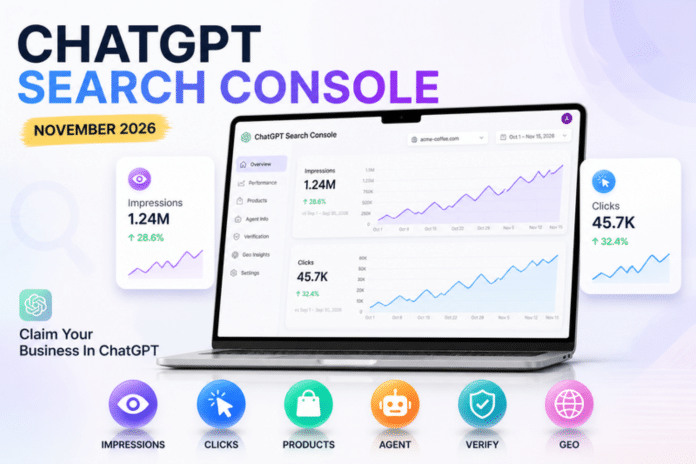
On November 6, 2026, screenshots of an unreleased OpenAI feature started spreading across the SEO community. A banner inside ChatGPT invites businesses to claim their business, see how it shows up in answers, and track impressions and clicks. SEOs immediately started calling it the ChatGPT Search Console, and the comparison is fair. This guide explains what was actually spotted, what is still unconfirmed, and what you can do today so your website is ready if it launches.
ChatGPT Search Console: Quick Summary
- What it is: an early, unannounced business dashboard inside ChatGPT, reported as a work in progress.
- Where it came from: a screenshot shared by Juozas Kaziukenas of Marketplace Pulse, then amplified by SEO consultant Lily Ray and covered by Search Engine Roundtable.
- What it measures: how often a business appears in ChatGPT answers (impressions) and how many people click through to the business website (clicks), shown as daily charts.
- Official status: OpenAI has not announced it and there is no public help page yet, so details can still change.
What Was Spotted Inside ChatGPT
The banner reportedly reads “Claim your business in ChatGPT” and lists four promises. Businesses can see how they show up, show customers what they offer, keep products and business details current, and let a business agent answer customer questions using context the owner controls. The screenshot also showed that the feature was marked unreleased or beta, and the person who found it said it looked close to launch.
That last point matters. Early finds like this are not a release. They show direction, not a date, and OpenAI can change or cancel any part of it before the public sees it.
What the Tool Appears to Do
1. Claim and verify your business
The first step is claiming a business profile, similar in spirit to claiming a Google Business Profile. One report mentions that connecting a Shopify store could be one way to verify ownership. That detail comes from a single source, so treat it as a possibility, not a confirmed method.
2. Track impressions and clicks
The dashboard reportedly shows two daily numbers. Impressions count how many times your business appeared in a ChatGPT response. Clicks count visits to your site from those answers. For the first time, businesses would get first-party numbers from OpenAI instead of relying on guesses from third-party prompt trackers.
3. Keep products and business info up to date
Businesses can add their latest products and details so the information ChatGPT uses stays fresh. For ecommerce and local brands, this could become as important as feed management is for Google Shopping.
4. A business agent you control
The banner also mentions an agent that answers customer questions using context supplied by the business. This suggests OpenAI wants ChatGPT to act as a front door for businesses, not just a list of links.
What Is Confirmed and What Is Not
- Confirmed by screenshots: a “Claim your business in ChatGPT” banner exists and shows impressions and clicks charts.
- Reported but not official: the verification method, the business agent details, and the idea that this is part of a wider business hub.
- Not confirmed at all: launch date, pricing, which countries get access, and whether query level data will be added later.
What the Tool Does Not Seem to Show
Based on the early screenshots and coverage, the dashboard does not expose the actual prompts people typed, user level data, or competitor benchmarks and rankings. It also would not explain why impressions or clicks go up or down. That is a big difference from Google Search Console, where the query report is the main reason most people log in.
Even so, first-party counts are valuable. If your GEO and AEO work is succeeding, this kind of dashboard would finally show it with accurate numbers.
Why This Matters for SEO and GEO
Until now, measuring ChatGPT visibility meant tracking referral traffic and paying for tools that simulate prompts. OpenAI already tags links clicked in ChatGPT search with a utm_source of chatgpt.com, so referral visits have been visible in analytics for some time. A native dashboard would add the missing piece: how often you were shown, not only how often you were clicked.
It also arrives next to ChatGPT’s growing ad business. Search Engine Roundtable notes that the tool appears to cover normal answers, not ads. If OpenAI follows the path Google took, free analytics could become the entry point for a larger business platform. If you are building your AI visibility strategy, our guide on how to measure ROI from AI search optimization shows how to track results while official data is limited.
How to Prepare Before It Launches
- Set up referral tracking now. In GA4, filter sessions where the source contains chatgpt.com so you have a baseline before any dashboard exists.
- Make your site crawlable for ChatGPT search. Check your robots.txt and security plugins so OAI-SearchBot is not blocked on pages you want surfaced.
- Clean up your business facts. Make sure your name, description, product pages, pricing and contact details are consistent across your website and public profiles.
- Add structured data. Organization, Product and FAQ schema help machines understand your pages. Our explainer on llms.txt for WordPress covers another useful signal.
- Write answer-ready pages. Clear headings, direct answers and honest comparisons are more likely to be mentioned than thin marketing copy.
- Be ready to verify. Keep admin access to your domain, store platform and business accounts so you can claim your profile quickly when access opens.
Will It Replace Google Search Console or Google Business Profile?
No. Google Search Console explains how your site performs in Google search. Google Business Profile lets you claim a listing, update details and talk to customers. OpenAI’s reported tool combines parts of both ideas inside ChatGPT, but it measures a different channel. Most businesses will need all of them, not one instead of another.
Frequently Asked Questions
Is the ChatGPT Search Console officially launched?
No. As of November 7, 2026, OpenAI has not announced it. It was spotted through screenshots, so availability, features and naming may change.
Is it really called ChatGPT Search Console?
That is a nickname used by SEOs. The banner itself talks about claiming your business in ChatGPT. There is no official product name yet.
What will businesses be able to see?
Reports point to daily impressions, meaning appearances in ChatGPT answers, and clicks to the business website. Prompt data and competitor rankings do not appear to be included.
Do I need to pay to claim my business?
Nothing about pricing has been shared. Do not assume it will be free or paid until OpenAI publishes details.
Can I claim my business right now?
Not unless you have been given early access. Published documentation from OpenAI does not yet describe a general business profile that owners can claim.
Will it show which prompts mention my brand?
Early coverage suggests it will not. Third-party tools that simulate prompts will likely stay useful for that, while the OpenAI dashboard could act as the accurate first-party check.
Does this cover ChatGPT ads?
Reports say the tool appears to focus on regular answers, not paid ads. This could change if OpenAI links the two products later.
How can I track ChatGPT traffic today?
Use GA4 or any analytics tool to look for traffic from chatgpt.com. Links clicked in ChatGPT search carry that source tag, so you can already measure visits even without impression data.
Will this help small and local businesses?
It could. If ChatGPT becomes a place where people ask for recommendations, a claimed and accurate profile may help local and ecommerce brands show correct details. The real benefit will depend on how OpenAI rolls it out.
Final Thoughts
The ChatGPT Search Console is not live yet, but the signal is clear. OpenAI wants businesses to treat ChatGPT as a channel they can claim, measure and manage. The smart move today is simple: track your chatgpt.com referrals, fix your business facts, keep your site crawlable and wait for the official announcement before changing your strategy. We will update this guide as soon as OpenAI shares confirmed details.