

What Is llms.txt?
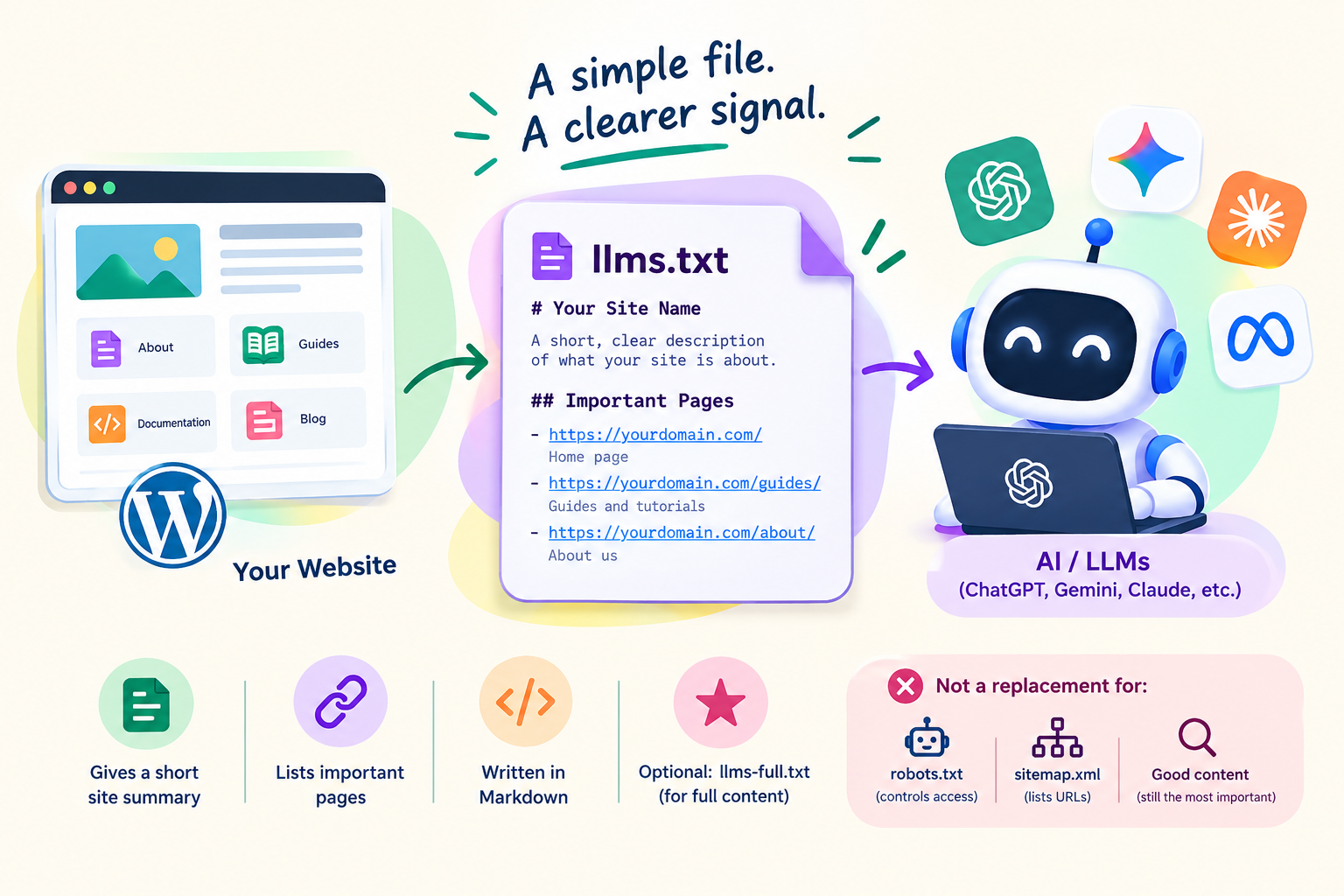
The llms.txt file is a proposed standard for helping large language models understand a website. It was proposed in 2024 by Jeremy Howard of Answer.AI. The idea is to place a plain text file in the root of your site, at yourdomain.com/llms.txt, that gives AI systems a short, clean summary of what the site is and a curated list of its most important pages.
A typical file includes the site name, a one or two sentence description, and sections that list important links with a short note about each. The format is written in Markdown, which is easy for both people and machines to read. An optional second file, often called llms-full.txt, can include the full text of key content in one place.
How Is llms.txt Different From robots.txt and sitemap.xml?
| File | Purpose | Audience |
|---|---|---|
| robots.txt | Tells crawlers what they may or may not access | Search and AI crawlers |
| sitemap.xml | Lists URLs so crawlers can find them | Search engines |
| llms.txt | Offers a curated, readable guide to your best content | Language models and AI tools |
Notice that llms.txt does not control access. It does not block or allow anything. It only suggests what to read.
Do AI Search Engines Actually Use llms.txt?
This is the key question, and the honest answer is that it is unclear. As far as publicly confirmed statements go, the major search and AI providers have not said that they rely on llms.txt for ranking or for choosing sources in AI answers, and some have said they do not. Some AI coding and documentation tools do read these files when a developer points them at a site, which is where the idea has the clearest use. Because policies and behavior change quickly, check recent statements from the platforms you care about before you decide how much weight to give it.
The practical conclusion is simple. Do not expect a traffic jump from adding the file. Treat it as a small, optional experiment.
Who Might Benefit From llms.txt?
- Documentation sites, where developers use AI tools to read your docs.
- Software and API companies, which want assistants to find accurate setup instructions.
- Large content sites with a confusing structure, where a curated list of key pages is useful.
- Anyone who wants to test whether AI tools pick up the file, and can accept a possible zero result.
A small blog with a clean structure and a good sitemap has the least to gain.
How to Create an llms.txt File
- List your most important pages, such as pillar guides, product pages and documentation hubs. Aim for quality, not a dump of every URL.
- Write a clear name and a one or two sentence summary of your site in plain language.
- Group links under simple headings, such as Guides, Tools and About, and add a short description beside each link.
- Use full, clean URLs and make sure every link works and returns a normal page.
- Save the file as plain text with the name llms.txt.
Keep the language factual. Avoid promotional claims, because the file is meant to help a machine understand your site, not to sell to it.
How to Add llms.txt to WordPress
Option 1: Upload the file manually
Use your hosting file manager or an SFTP tool and place the file in the root folder of your WordPress installation, the same folder that contains wp-config.php. Then visit yourdomain.com/llms.txt in a browser to confirm it loads as plain text.
Option 2: Use your SEO plugin
Some SEO plugins have added features that generate and manage an llms.txt file. Check whether the plugin you already use offers it in its settings before you install anything new. If you generate the file automatically, still open it and review the contents, because auto-generated lists can include pages you would not choose.
Option 3: Add it through a small code snippet or redirect
If your host does not allow root file uploads, a developer can serve the file through a custom route. This is more technical and only worth doing if you have a clear reason.
Common Mistakes
- Listing hundreds of URLs instead of a curated set.
- Including pages that are blocked, redirected or set to noindex.
- Forgetting to update the file when major pages move or change.
- Believing the file replaces robots.txt rules or a proper sitemap.
- Expecting immediate ranking or traffic changes.
What to Prioritize Before llms.txt
If your goal is visibility in AI answers, several fundamentals matter more than a new file.
- Make sure search and AI crawlers can reach your content, and review your robots.txt rules deliberately.
- Publish clear, accurate, well-structured pages that answer real questions directly.
- Use headings, short summaries, tables and FAQs so key facts are easy to extract.
- Add accurate structured data where it fits the page.
- Build trust with real authorship, original information and a clear site identity.
- Keep pages fast and mobile friendly.
How to Check Whether llms.txt Does Anything for You
Look at your server logs or analytics for requests to the file and note which user agents fetch it. Compare traffic from AI assistants before and after, but be careful about drawing conclusions from small numbers. A flat result is useful information too. It tells you that your effort is better spent elsewhere.
Final Verdict
The llms.txt idea is cheap to try and easy to remove. For documentation and developer-focused sites it makes the most sense. For most blogs it is optional, and it should never come before crawlability, content quality and structure. If you add it, keep it short, curated and accurate, and measure what happens.
Frequently Asked Questions
What is llms.txt?
It is a proposed standard file placed at the root of a website that gives language models a short summary of the site and a curated list of its most important pages.
Does Google use llms.txt?
Public statements from major providers do not confirm that they use llms.txt for ranking or for choosing sources in AI answers. Check current statements, because this changes quickly.
Where do I put llms.txt on WordPress?
Place it in the root folder of your WordPress installation, the same folder as wp-config.php, so it loads at yourdomain.com/llms.txt. Some SEO plugins can also generate it for you.
Is llms.txt the same as robots.txt?
No. Robots.txt controls what crawlers may access, while llms.txt only suggests which pages are most useful for an AI to read. It does not block or allow anything.
Should every website add llms.txt?
Not necessarily. It makes the most sense for documentation and developer sites. For most blogs it is an optional low-cost experiment that comes after crawlability, content quality and structure.
—