
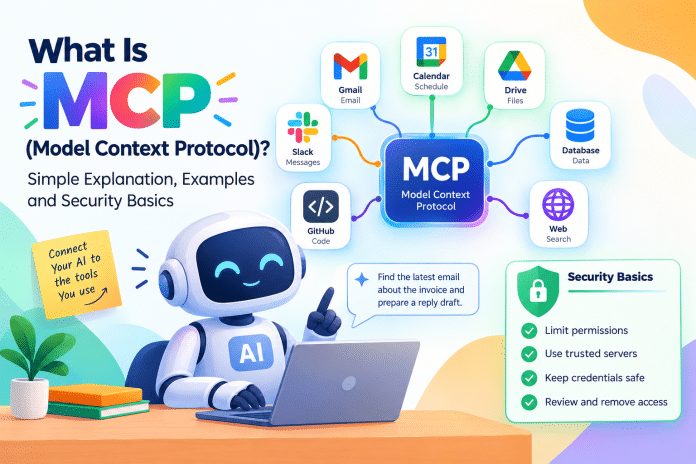
What Is MCP in Simple Words?
Think of a USB-C port. Before a common port existed, every device needed its own cable. MCP aims to do the same for AI. Instead of every AI app building a custom integration for every service, a service builds one MCP server, and any AI app that understands MCP can use it.
Without MCP, an AI assistant can only work with the text you paste into the chat. With MCP, it can read your calendar, search your inbox, look up a record in a database or create a draft, if you give it permission. That shift is what turns a chatbot into something closer to an agent.
How MCP Works: Host, Client and Server
MCP has three main parts.
- Host: the AI application you use, such as a chat app or a coding tool.
- Client: a component inside the host that talks to MCP servers.
- Server: a small program that exposes a service to the AI, for example a Gmail server or a file server.
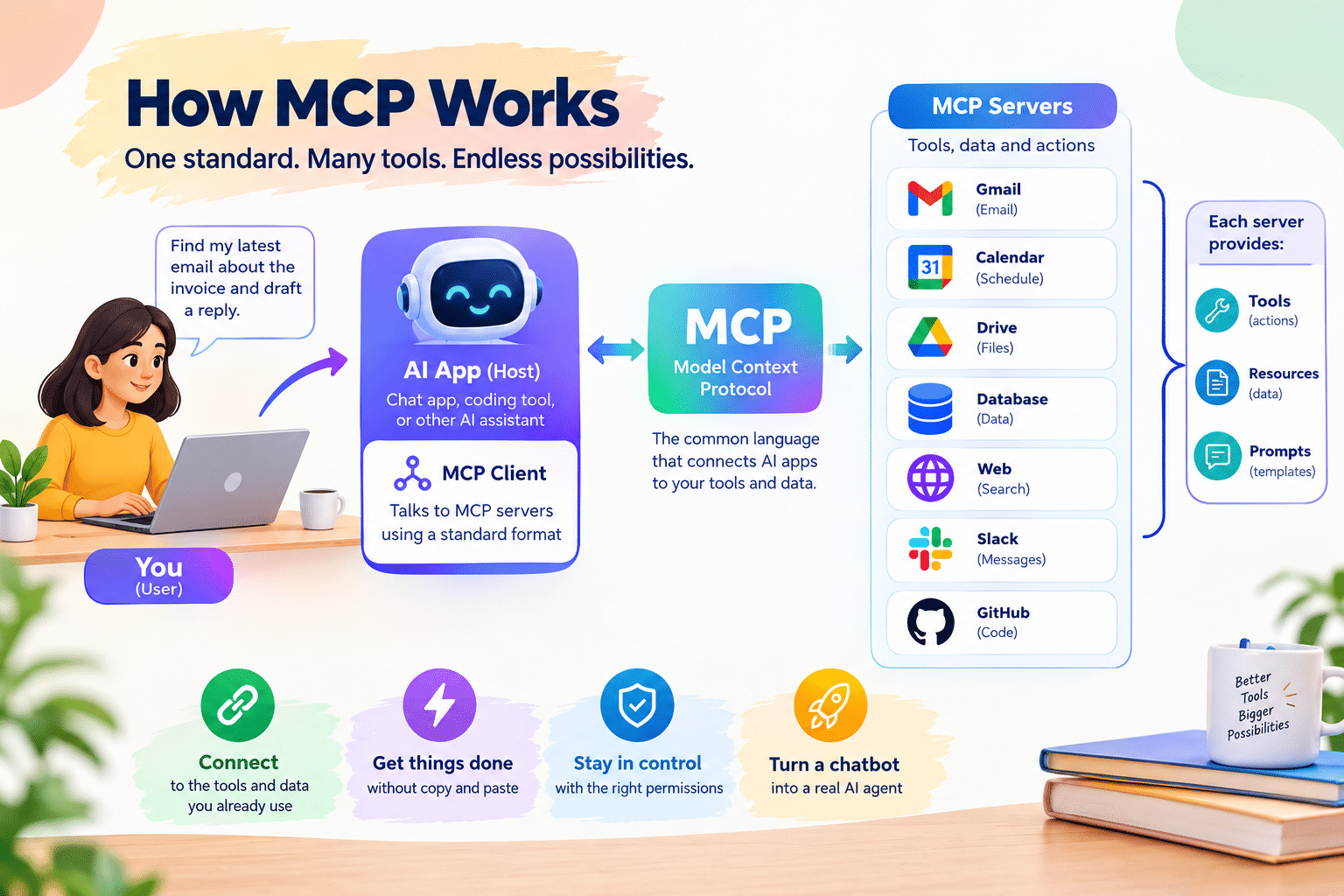
A server can offer three kinds of things. Tools are actions the AI can run, such as search or create a draft. Resources are pieces of data the AI can read, such as a document. Prompts are reusable templates for common tasks. Servers can run on your own computer or be hosted online, and they communicate with the host using a standard message format.
Real Examples of MCP in Daily Work
- Email: ask an assistant to find the thread about an invoice and prepare a reply as a draft for you to review.
- Research and marketing: connect keyword and analytics tools so an assistant can pull data and summarize it without you copying numbers between tabs.
- Coding: let a coding assistant read a repository, run tests or query a database during development.
- Automation: connect an automation platform so an assistant can trigger workflows across thousands of apps.
- Files and notes: search and summarize documents stored in a drive or a notes app.
Each of these saves the same thing: the copying and pasting that normally sits between you and your data.
MCP vs API: What Is the Difference?
An API is a way for software to talk to a specific service. MCP is a standard layer on top that lets an AI discover what a service can do and call it in a consistent way. A developer still builds the server using the service’s API. The advantage is that an AI app does not need custom code for each service, because it already speaks MCP.
How to Use MCP Without Being a Developer
Most people never touch the protocol directly. Many AI apps now include a connectors section where you pick a service, sign in and approve access. Behind the scenes, that uses MCP. The basic steps are:
- Open the connectors or integrations area of your AI app.
- Choose the service you want to connect and sign in.
- Review the permissions carefully and choose the narrowest access that meets your need.
- Start with a harmless task, like searching or summarizing, before allowing anything that changes data.
- Check the results and review any draft or action before it goes out.
Developers can also run their own servers locally or host them, which is useful for connecting internal tools and private databases.
MCP Security: What Can Go Wrong?
Giving an AI access to your tools is powerful, and that means the risks are real. The main ones are easy to understand.
Prompt injection
An AI reads content from emails, web pages and documents. A malicious person can hide instructions inside that content, hoping the AI will follow them. If the AI has permission to send messages or delete files, a successful injection could cause damage. The defense is to limit what the AI can do and to require your approval for sensitive actions.
Over-broad permissions
Granting full access when read-only access would do is the most common mistake. If an assistant only needs to search email, do not let it send email.
Untrusted servers
An MCP server is software that runs with access to your data. Install servers only from sources you trust, check who maintains them and avoid random packages from unknown authors.
Leaked credentials
Servers often need API keys or tokens. Store them securely, never paste them into chats and rotate them if you suspect exposure.
A Safe MCP Checklist
- Start with read-only access and add write access only when you need it.
- Prefer actions that create drafts over actions that send or publish.
- Keep connected accounts separate from your most sensitive accounts when possible.
- Review what each connector can access, and remove ones you no longer use.
- Be cautious when an AI summarizes content from unknown senders or untrusted websites.
- Keep software and servers updated.
Why MCP Matters for the Future of AI Agents
Agents need to take actions, and actions need connections. A common standard lowers the cost of building those connections and makes it easier to switch between AI products without losing your integrations. It also raises the stakes for security, because more connected tools means more places where something can go wrong. If you want to see how agent products are changing, read our look at OpenAI Dots and the guide to Meta Muse and its privacy trade-offs.
Final Verdict
MCP is a standard way for AI assistants to use outside tools and data. For users, it shows up as connectors that save time by removing copy and paste. For safety, treat every connection like giving a new employee access: start small, limit permissions, require approval for sensitive actions and remove access you no longer need.
Frequently Asked Questions
What does MCP stand for?
MCP stands for Model Context Protocol, an open standard that lets AI assistants connect to outside tools and data in a consistent way.
Who created MCP?
Anthropic introduced the Model Context Protocol in late 2024, and many AI products and developer tools have adopted it since.
Is MCP the same as an API?
No. An API connects software to one specific service. MCP is a standard layer that lets an AI discover and use many services in a consistent way, usually built on top of those services’ APIs.
Is MCP safe to use?
It can be safe if you limit permissions, use trusted servers, prefer read-only access and require approval before sensitive actions. The main risks are prompt injection, over-broad permissions and untrusted servers.
Do I need to be a developer to use MCP?
No. Many AI apps offer a connectors section where you sign in to a service and approve access, and MCP works behind the scenes.
—